What the app is
Take a photo of a neighborhood stray cat and the app answers "wait — is this cat already in our neighborhood dex?", letting neighbors build a shared sighting record together. It ships as a PWA (Progressive Web App — a website you can install on your home screen and use like an app).
One decision shapes everything: the AI that recognizes cats runs inside the user's browser, not on a server (this is called on-device AI). As a result:
- Server inference costs zero. No GPU servers — the whole thing runs on free-tier Postgres. The server's only job is a lightweight "find similar vectors" search.
- Only an embedding vector leaves the device, never the original photo. An embedding is a list of numbers (384 of them here) that an AI model produces as a summary of an image. You cannot reconstruct the original photo from those numbers, which is good for privacy.
- The model stays in the browser cache. After a one-time ~22MB download, recognition starts instantly on every revisit.
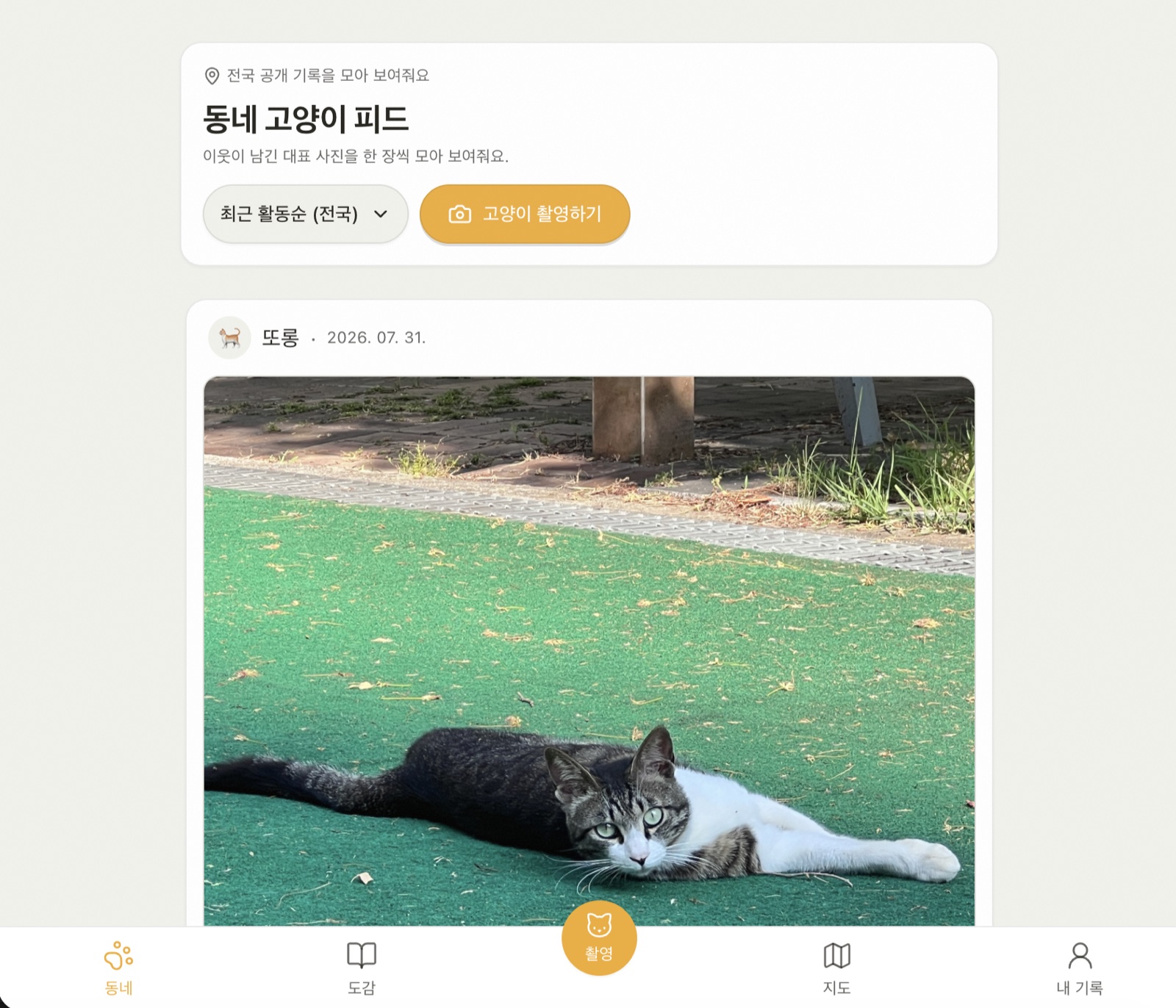
The neighborhood cat feed. Neighbors' records stack up as one representative photo each, and "Capture a cat" is the entry point to the recognition pipeline.
The recognition pipeline — from one photo to a dex record
Camera/upload
   │
   ▼  ① Detection (browser)
MediaPipe EfficientDet-Lite2 ──on failure──▶ COCO-SSD (tfjs) fallback ──on failure──▶ manual crop
   │
   ▼  ② Embedding (browser, transformers.js · WebGPU→WASM)
DINOv3 ViT-S/16 (q8, ~22MB) CLS token → 384-dim L2-normalized vector
   │
   ▼  ③ Matching (Supabase RPC)
Geo filter + pgvector cosine ranking → same cat? record in the dex
① Detection finds where the cat is in the photo and crops just that region. First choice is MediaPipe's EfficientDet-Lite2 model; if that fails, TensorFlow.js's COCO-SSD takes over; if even that fails, the user draws the region by hand. This three-stage fallback exists so that no device ever hits "recognition failed, so you can't record".
② Embedding feeds the cropped cat image into DINOv3, a vision model (shrunk to 22MB with q8 quantization), which summarizes it as 384 numbers. transformers.js runs it — on WebGPU (the browser standard for using the GPU) when the device supports it, otherwise on WASM (a way to run near-native-speed code in the browser). The vector is L2-normalized (scaled to length 1), which makes cosine similarity — comparing only the "direction" of two vectors — accurate.
③ Matching happens on the server (Supabase's Postgres): pgvector, a vector-search extension, ranks "cats sighted nearby whose vector direction is most similar", with PostGIS (a geographic-data extension) handling the location filter.
Two details prevent silent disasters. Each vector is stored with its model version, so swapping models later never mixes old-model and new-model vectors in one comparison (vectors from different models are meaningless to compare). And vectors with the wrong dimension or broken numbers (NaN etc.) throw in a pure-function guard before ever reaching the DB — one bad vector could otherwise quietly poison every search result.
No one knows the exact location
A dangerous trap for stray-cat apps: publishing exact coordinates invites abuse. So coordinate handling lives in a separate pure-function package, and raw coordinates never cross that function's boundary.
- Public coordinates snap to a 250m grid (500m for kittens). The position on the map means "somewhere in this grid cell", not the real coordinate.
- The marker's position inside the cell is a deterministic offset computed from the cat's ID. Because it isn't random, it stays put across refreshes — and averaging repeated queries cannot recover the original coordinate either.
- Especially vulnerable (
sensitive) cats publish no coordinates at all.
Cache design — the server is the truth, everything else is a performance layer
The data principle: the server (Postgres) is the SSOT (Single Source of Truth). Every client-side cache is just "a copy for showing things fast", never the truth. Server data lives only in React Query memory within the tab (rechecked after 10 seconds), and a refresh clears that memory, so the app asks the server again.
ETag — "ask, but if nothing changed it's almost free"
The problem: running on a free tier means the cost of asking the server itself must shrink. But extending cache lifetimes would delay neighbors' new records. The standard tool for this dilemma is the ETag.
The basic ETag flow:
- When the server responds, it attaches a version-marker string (the ETag) in a header.
- On the next request the browser sends
If-None-Match: <the ETag it received>— meaning "I have this version; did it change?". - If the version is unchanged, the server replies with 304 Not Modified and no body. The browser reuses what it has. Transfer cost is nearly zero.
But a naive implementation has a trap. The usual order is "build the full response → hash it → compare with the ETag" — which means even a 304 pays the full DB query cost. Only bandwidth is saved.
This app flips the order. So the ETag can be computed before fetching the payload, it uses "last activity time" as the version marker instead of the response body:
- Cat detail and comments: read only that cat's
last_activity_at(the time of its last like/comment/etc.) — a cheap lookup — and build the ETag from it. If it matches the client's ETag, the heavy joins and RPCs never run at all; an empty-body 304 ends the request. - Nearby cat lists: the same decision, using the most recent
last_activity_atinside the queried area (bbox). - Page responses: content differs by login state, so the cache is split by
Cookieand versioned with a 5-minute epoch. Only this path deliberately accepts up to 5 minutes of eventual consistency (briefly seeing slightly old data).
In short: instead of raising staleTime (the cache freshness window) to cut traffic, the app keeps the 10-second freshness the user experiences and cuts only the server's DB cost.
Photos — why I built image optimization myself
Photos are stored in Supabase Storage, but making a round trip to Storage on every request is slow and costly. Normally Vercel's image optimization solves this for you.
But this app runs on Vercel's free plan. At this stage, with few users, image optimization wasn't worth the cost. So I filled that gap with a cache I built myself — and to be clear, it's a transitional device I'll remove once growth justifies a paid plan.
That cache is a per-server-process LRU (Least Recently Used — evicts whatever hasn't been used longest; max 500 entries / 50MB). Its behavior comes down to a three-stage safety net:
- Cache hit — if the photo is already held, skip Storage and respond immediately.
- Coalescing concurrent requests — even if requests for the same photo arrive at once, they collapse into a single Storage read.
- Final fallback — if the cache misses and the Storage read fails too, a 307 redirect to a signed URL (a temporary signed access link) still renders the photo. Even in the worst case, the photo never fails to appear.
This LRU is not the SSOT either. It's just a performance optimization that can vanish on restart without harm.
Writes — your own actions appear instantly
Tapping "like" and waiting for the server before the screen changes feels broken. So writes use optimistic updates (changing the screen first without waiting for the server):
- The moment you tap, the cache is patched immutably (creating a modified copy instead of editing in place). The patch logic is pure functions with boundary-value tests written first.
- If the server request fails, a pre-taken snapshot rolls the cache back.
- When the request settles, only the affected view scope (detail only / up to the feed / the whole list) is invalidated — refetching just what's needed.
The net effect: your own actions show up instantly on the page you're viewing; only other people's actions ride the 10-second window.
Architecture — replaceable pieces
The code follows FSD (Feature-Sliced Design): references flow only in the direction app → views → widgets → features → entities → shared, and each slice exposes only what its index.ts publishes. With screens, features, and domain logic depending in one direction, the blast radius of a change stays predictable.
Data access is wrapped in the repository pattern. The UI knows only a "cat repository" interface; the real app injects an HTTP implementation, while tests and the demo swap in MSW (a tool that fakes API responses in the browser) and IndexedDB implementations — which is why demo mode runs the full flow without Supabase. Domain rules (optimistic patches, embedding guards, coordinate snapping) are all pure functions, tests first.
What was deliberately left out — and why
- No polling. Asking the server on a timer directly contradicts the traffic-reduction goal.
- No Realtime. Realtime sockets are a tool for "fresher", not "cheaper". It gets added when a real need shows up.
- No stale data while offline. The service worker caches only the app shell (the frame of the UI), and offline data requests surface an explicit error state. Saying "you're offline" honestly fits the "server is the SSOT" contract better than presenting old data as if it were current.